TQL Carrier Dashboard
- 4.8
- Rating
- 500.00K
- Installs
- Free
- Price
 Analysis by App-foxy
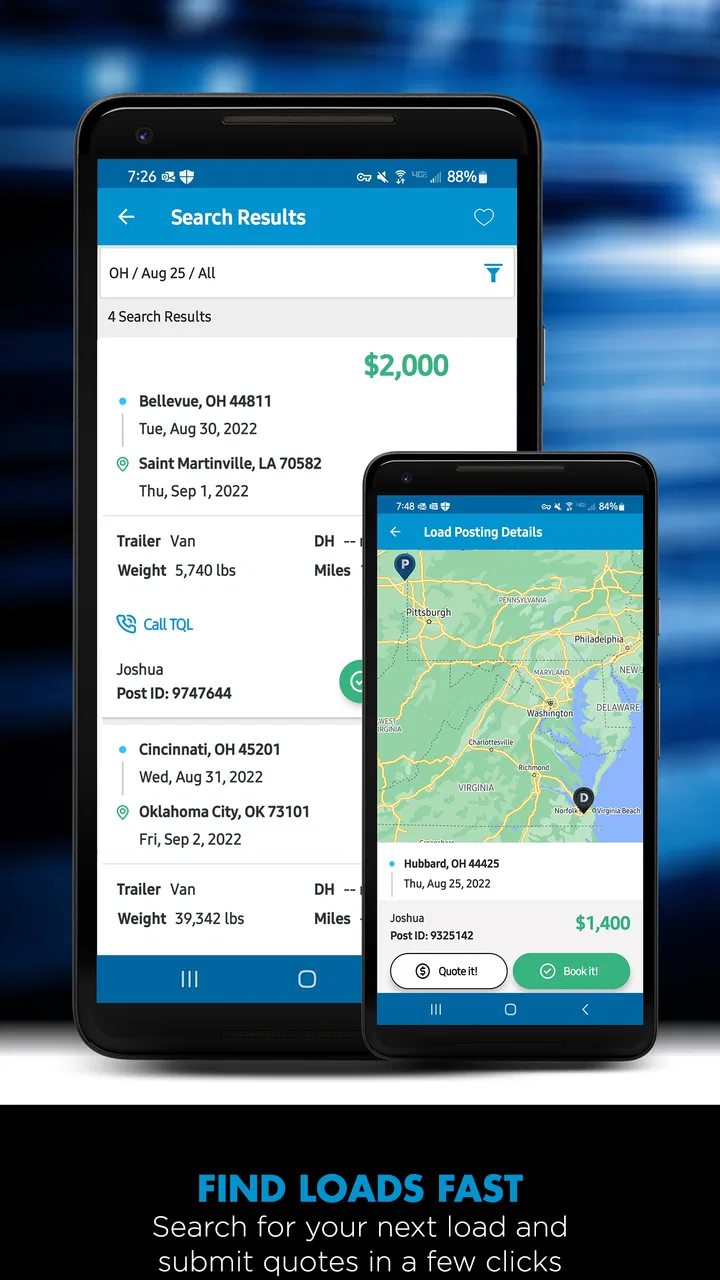
I approached TQL Carrier Dashboard as a practical work tool rather than a general navigation app, and that distinction matters from the first screen. It is built for carriers who need to look for freight, manage the details around a load, and keep paperwork moving while they are away from a desk. In my experience, its value is less about showing a map and more about bringing several time-sensitive tasks into one mobile workflow.
The app comes from Total Quality Logistics, LLC and sits in the Maps & Navigation category. It is free to install, rated for Everyone, and has reached more than 500 thousand installs. That broad age label does not mean it is aimed at children; the actual audience is working adults handling transportation jobs. A household may share a phone or tablet, but the account itself should be treated as a professional workspace, not a family entertainment app.
What makes it interesting is the combination of load discovery and document handling. Many carrier tools are useful for one side of the job, while the other side still happens through email, camera apps, messaging, or a desktop browser. Here, the practical promise is to reduce that switching. I found the strongest case for it among independent drivers, small fleets, and dispatchers who need to act quickly when a suitable load appears.
You May Also Like

 Blood Strike: 2.5 Anniversary
Blood Strike’s Loadouts Turn Every Drop Into a Tactical Gamble
A close look at Blood Strike’s custom loadouts: how fast access to signature weapons reshapes its battle royale rhythm, rewards preparation, and narrows the gap between fights.

 Pandora - Music & Podcasts
Pandora’s Music Is Easy to Start, but Harder to Recover
Pandora’s strength is its low-effort path from a seed to a station. Its weak spot is how much confidence it asks you to place in connection, setup, and quiet recovery.

 8 Ball Pool
 Is Built on Rivalries, Rematches, and Routine
A close look at the rivalries, rematches, shared routines, and unanswered safety questions that turn a quick pool match into a persistent mobile community.

 Samsung Music
’s Quiet Strength Is Playing What You Already Own
Its reach comes less from spectacle than from dependable access to a personal library. That simplicity is both the app’s strongest retention engine and its ceiling.

 AccuWeather: Weather Radar
AccuWeather Review: A Quick, Clear Forecast for Everyday Decisions
For everyday plans, the best forecast is the one you can understand quickly. AccuWeather makes rain timing, radar, and local conditions easy to act on, with a few trade-offs.

 Hill Climb Racing
Why Hill Climb Racing Still Turns Crashes Into One More Run
A tiny car, a bumpy hill and one more upgrade: Hill Climb Racing keeps resurfacing because its simple chaos makes every near-miss feel personal.
More From Our News Desk



How the app fits a shared work and household routine
A realistic scenario is easy to picture. A driver finishes a delivery, checks the next route, and wants to find another load without waiting to return to an office. A spouse or dispatcher may be helping coordinate the day from the same device at home, while the driver is on the road. The app can serve as the shared point for checking opportunities and preparing documents, but it works best when everyone understands whose account is active and who is responsible for each action.
That boundary is important because a load search is not the same as casually browsing directions. Details can affect scheduling, equipment decisions, and communication with a broker. If several people use one phone, I would avoid leaving the app open for general household use. A family member looking at the device should not accidentally alter a work session, scan the wrong paperwork, or send an action under someone else’s identity.
I also would not treat the app as a replacement for a family calendar or a shared messaging service. Its purpose is transportation work. Household coordination may happen around it, but the app should remain the source for the carrier’s own load-related tasks. That separation makes the workflow easier to audit when a driver and dispatcher are dividing responsibilities.
For a small operation, the useful arrangement is usually simple: one person searches and reviews available work, another checks timing and equipment fit, and the driver handles the documents connected with the actual job. The app does not need to become the entire household’s communication hub to be useful. In fact, keeping it focused is one of its strengths.
What I would prepare before relying on it
Before using it during a busy day, I would decide who owns the account, who is allowed to use the device, and where scanned documents will be reviewed afterward. That may sound like ordinary housekeeping, but mobile work tools are often used in rushed conditions. A clear routine prevents a shared-device situation from becoming a paperwork problem.
I would also keep the phone charged and make sure the driver can read the important load information without stopping in an unsafe place. The app may make a task mobile, but it does not make roadside multitasking safe. Searching and reviewing should happen while parked or through a dispatcher who is not driving.
Another practical step is to agree on naming and filing habits outside the app if documents will later be transferred or archived elsewhere. Scanning is valuable only when the resulting paperwork can be found and matched to the correct load. The app helps capture the document, but a consistent household or fleet routine still determines whether the record stays organized.
Account boundaries matter more than the age label
The Everyone rating makes the app broadly accessible from a content-classification perspective, but I would not interpret that as an invitation for unsupervised child use. A child might be able to open a simple screen, yet the decisions connected with freight, documents, and schedules belong to an adult account holder. The relevant trust question is not whether the interface looks approachable; it is whether the person using it understands the consequences of handling business information.
For a shared family device, I prefer a clear handoff: the driver or dispatcher finishes the session, checks that the correct work is complete, and then returns the device for ordinary use. If a teenager helps with scanning or reading information, I would keep that help limited to a defined task and have the responsible adult verify the result. That is especially important when a document image is unclear or when multiple loads are being considered.
This approach also protects privacy in a practical way. A work account can contain contact details, shipment information, and paperwork that should not be casually exposed. I would not let a guest use the app simply because the phone is available. The free price removes a purchase barrier, but it does not remove the need for sensible account control.
Finding loads without turning speed into guesswork
The load-search function is the center of the experience. The obvious benefit is speed: instead of waiting to reach a computer, a carrier can review opportunities while managing the day from a mobile device. That is particularly useful after a delivery, when the next decision may depend on location, timing, and the type of equipment available.
My advice is to treat fast searching as a first filter, not as an automatic yes. A load that looks attractive at a glance still needs a careful check against the route, available hours, equipment, pickup expectations, and the driver’s existing commitments. A mobile screen encourages quick decisions, so I would deliberately pause before accepting or pursuing anything that creates a difficult sequence later.
This is one of the app’s less obvious trade-offs. Speed can reduce idle time, but it can also make an unsuitable option feel urgent. The best workflow is to use the app to surface possibilities quickly, then confirm the practical details with the person coordinating the run. For a solo carrier, that second check can be a short written note or a deliberate review of the day’s route before committing.
The app is therefore more useful for active carriers than for someone who only wants a map or occasional route guidance. A conventional navigation app remains better for turn-by-turn driving. A desktop freight marketplace may still be more comfortable for comparing many options at once. TQL Carrier Dashboard earns its place when the user needs a mobile connection to freight work, not when the task is simply getting from one address to another.
Document scanning is where the workflow becomes practical
The document-scanning capability changes the app from a load browser into a more complete field tool. In everyday use, paperwork often arrives when the driver is away from a printer or office. Having a way to capture documents from the same work environment can save a separate trip through a camera app, file manager, and email thread.
I would use scanning immediately after the relevant paperwork is available, while the load details are still fresh. Waiting until the end of a long day creates the risk of mixing documents from different stops. A good habit is to check the image before moving on: the page should be fully visible, readable, and associated with the right job. A scan that is technically saved but hard to read is not a successful scan.
This is also where shared-device coordination needs discipline. If a spouse or dispatcher scans a document at home while the driver is handling another stop, both people should know which load it belongs to. Otherwise, the convenience of remote help can create confusion. I would use a simple verbal or written confirmation outside the app before scanning anything that could be confused with another shipment.
The trade-off is that scanning does not eliminate document responsibility. It reduces friction in capturing paperwork, but the user still needs to inspect the result and follow the carrier’s normal recordkeeping process. I see this as a strong time saver, not a substitute for checking business records.
Coordination between driver, dispatcher, and family helper
The app works best when each person has a defined role. A driver can use it to review work between stops, while a dispatcher or trusted household helper can assist with comparing options and keeping an eye on paperwork. The important point is to avoid two people making independent decisions at the same time without confirming what has already happened.
For example, if the driver is considering a load and someone at home is also reviewing the account, I would agree on a simple status language: still reviewing, ready to discuss, or handled. That kind of coordination is not a special app feature; it is a human workflow that prevents duplicate effort. The app provides the work context, while the people using it provide the clarity.
This arrangement is especially helpful for independent carriers who do not have a formal dispatch office. A partner can help with the administrative side without needing to sit beside the driver. Still, I would keep final responsibility with the person authorized to make the business decision. A helper should not be assumed to understand equipment limits, route realities, or contractual implications merely because the screen is easy to open.
For a larger fleet, I would compare the mobile convenience with the company’s existing systems before making it central to operations. The app may be excellent for a driver in the field, while a desktop system remains better for broader planning, reporting, and team visibility. Using each tool for the job it handles best is more sensible than forcing one mobile app to replace every office process.
Version, compatibility, and the everyday experience
The current version is 10.1.4, and the app requires iOS 10 or later. That minimum makes it available to a wide range of supported Apple devices, including some older hardware, although real-world comfort will still depend on the phone’s condition, screen size, storage, and camera quality. A tired camera can undermine document scanning even when the application itself opens normally.
I would test the complete routine before depending on it for a critical workday: open the account, search for a realistic load, inspect the information carefully, and scan a sample document under the lighting conditions normally found in the cab or office. A short trial reveals more than simply checking whether the app installs. It also lets a household decide whether the device is comfortable for both work and personal use.
Because the app is free, the main cost is not an upfront purchase. The real cost is attention: learning the workflow, checking documents, and maintaining clear responsibility when more than one person helps. That is a fair exchange for a carrier who regularly needs mobile access, but it may not be worthwhile for someone who rarely handles loads or already has a better-established desktop process.
Who should use it, and who should choose another tool
I would recommend it to an independent carrier who wants a focused mobile way to search for freight and handle documents without returning to a desk. It also makes sense for a small operation where a driver and a trusted coordinator share responsibilities. The combination is more useful than either feature alone because finding the next job and managing the related paperwork often happen close together.
I would be more cautious for a casual user who only needs navigation. A standard map app will usually be the clearer choice for directions, traffic awareness, and everyday travel. I would also hesitate to make this the only tool for a fleet that needs extensive planning, deep reporting, or a complex multi-user office workflow. A dedicated transportation management platform may offer a better fit for those needs, even if it is less convenient on the road.
Households should also skip it as a shared general-purpose app. It is not designed to organize chores, coordinate school schedules, or provide a child-friendly family dashboard. The Everyone rating describes content suitability, not a set of family controls or a household account model. Its best shared use is professional cooperation between adults who understand the work being handled.
My final view after using it as a work companion
The strongest reason to choose TQL Carrier Dashboard is the way it connects load searching with document capture in a mobile setting. That combination addresses a real gap for carriers who spend much of the day away from a desk. It can make a driver’s routine more responsive and give a small operation a practical way to divide work between the road and home.
My reservations are about workflow discipline rather than the basic idea. Fast access can encourage rushed decisions, scanning still requires careful checking, and a shared device needs firm account boundaries. The app is most effective when it supports a clear process instead of becoming an informal place where everyone in the household taps around.
With that understanding, I see it as a focused tool for transportation professionals rather than a universal navigation solution. Its 4.8 average from around 21 thousand ratings suggests that many users find the experience worthwhile, while roughly 1.6 thousand written reviews show that it has generated substantial user feedback. Those figures are useful context, but my recommendation is more specific: try it if you regularly search for loads and handle paperwork in the field, and keep a conventional map or broader office system for tasks this app was not built to cover.
In my household-use scenario, I would keep the driver or dispatcher as the account owner, let a trusted adult assist only with agreed tasks, and review every scan before considering the job complete. Used that way, TQL Carrier Dashboard feels like a sensible bridge between freight work on the road and coordination at home. It does not remove the need for judgment, but it can remove enough small delays to become a genuinely useful part of a carrier’s day.
FAQs for TQL Carrier Dashboard
01What is the TQL Carrier Dashboard app used for?
The TQL Carrier Dashboard app is designed to streamline operations for trucking carriers. It provides tools for tracking loads, negotiating rates, and managing documents. This app helps carriers stay organized and efficient, offering real-time updates and notifications to ensure seamless communication between dispatchers and drivers.
02Is the TQL Carrier Dashboard app free to use?
Yes, the TQL Carrier Dashboard app is free to download and use. However, users must be registered carriers with Total Quality Logistics to access its features. The app integrates with the TQL network, providing exclusive tools for carriers at no additional cost.
03Which devices are compatible with the TQL Carrier Dashboard app?
The TQL Carrier Dashboard app is available for both Android and iOS devices. It requires Android 6.0 or later and iOS 11.0 or later. The app is optimized for smartphones and tablets, ensuring that users can access its features across a variety of devices without any issues.
04How secure is the TQL Carrier Dashboard app?
The TQL Carrier Dashboard app prioritizes user security by implementing advanced encryption protocols. It ensures that all data, including personal and financial information, is protected. Regular updates and security patches are rolled out to address any vulnerabilities, keeping user data safe and secure.
05Can I track multiple loads simultaneously using the app?
Yes, the TQL Carrier Dashboard app allows users to track multiple loads at once. It offers a comprehensive overview of all active shipments, enabling carriers to manage and monitor them efficiently. Real-time updates and notifications keep users informed about the status of each load, enhancing overall operational efficiency.
Pros
- User-friendly interface design.
- Real-time shipment tracking.
- Easy document management.
- Customizable notifications.
- Comprehensive load search feature.
Cons
- Limited offline functionality.
- Occasional app crashes reported.
- Requires frequent updates.
- Lacks advanced analytics tools.
- Some features are subscription-based.

TQL Carrier Dashboard
Gallery